Scalable Cluster in the Cloud
Welcome to Scalable Cluster in the Cloud documentation. This project is an extension to Cluster in the Cloud found at: https://cluster-in-the-cloud.readthedocs.io/en/latest/index.html
Intro to Cluster in the Cloud
The University of Bristol Advanced Computing Research Centre has developed an open-source project, called Cluster in the Cloud, for the creation and management of computing clusters hosted in the cloud. It is currently the only such project that supports hosting on the Oracle Cloud. This implementation allows building a homogeneous clusters of a predefined size. The cluster is self-managed, stopping idle nodes and starting them again if they are needed. This management system is intended to allow using the system on a pay as you use basis. However, while most VM and Bare Metal instances are not being charged while stopped, DenseIO nodes are. Furthermore, the storage associated with the compute nodes is still being charged even if the nodes are stopped.
Motivation: Why Scalable Cluster in the cloud?
This guide shows how Cluster in the Cloud can be extended to create an infinitely scalable heterogenous compute cluster, that is not of a predefined size, but can automatically grow or shrink in size depending on system load.
In appearance, the system looks like a large heterogeneous compute cluster with multiple execute queues:
[codrin@mgmt ~]$ sinfo
PARTITION AVAIL  TIMELIMIT  NODES  STATE NODELIST
compute      up   infinite     20   idle compute[001-020]
highmem      up   infinite      3   idle highmem[001-003]
highcpu*     up   infinite      3   idle highcpu[001-003]
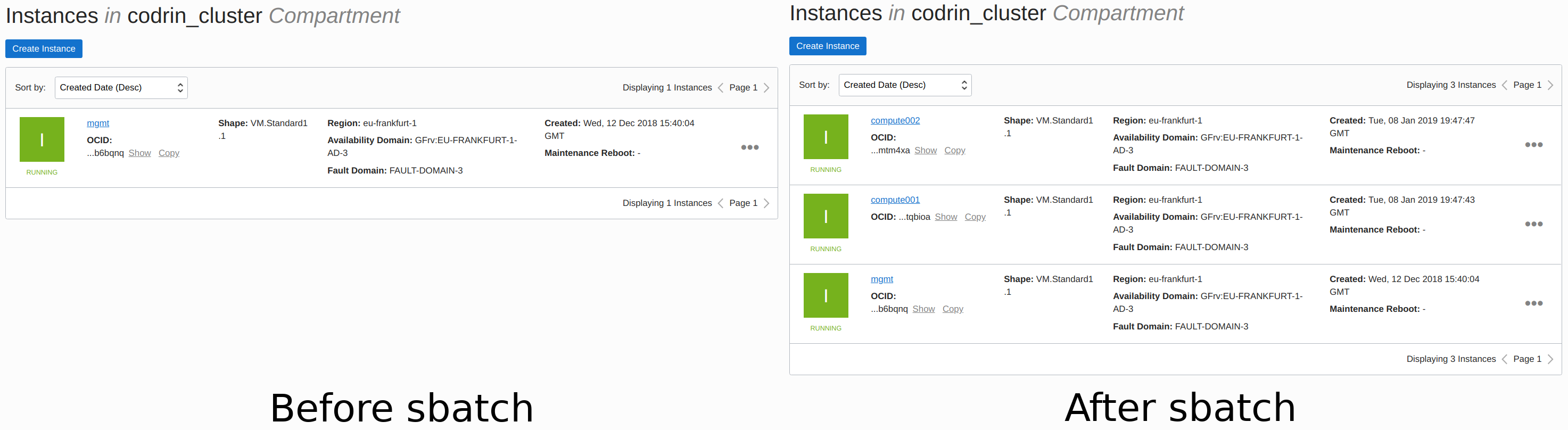
Behind the scenes, Oracle compute instances are created and destroyed on-they-fly depending on cluster utilization. By dynamically creating and destroying instances, this process avoids paying for unused resources. Furthermore, compared to the existing approach, this implementation does not need to spin-up the whole cluster to present a close-to-infinite capacity. For submitting the following job:
[codrin@mgmt ~]$ sbatch mpisubmit
No compute nodes are available, so the management node will schedule the job and create two instances.