Workload Manager level - Slurm
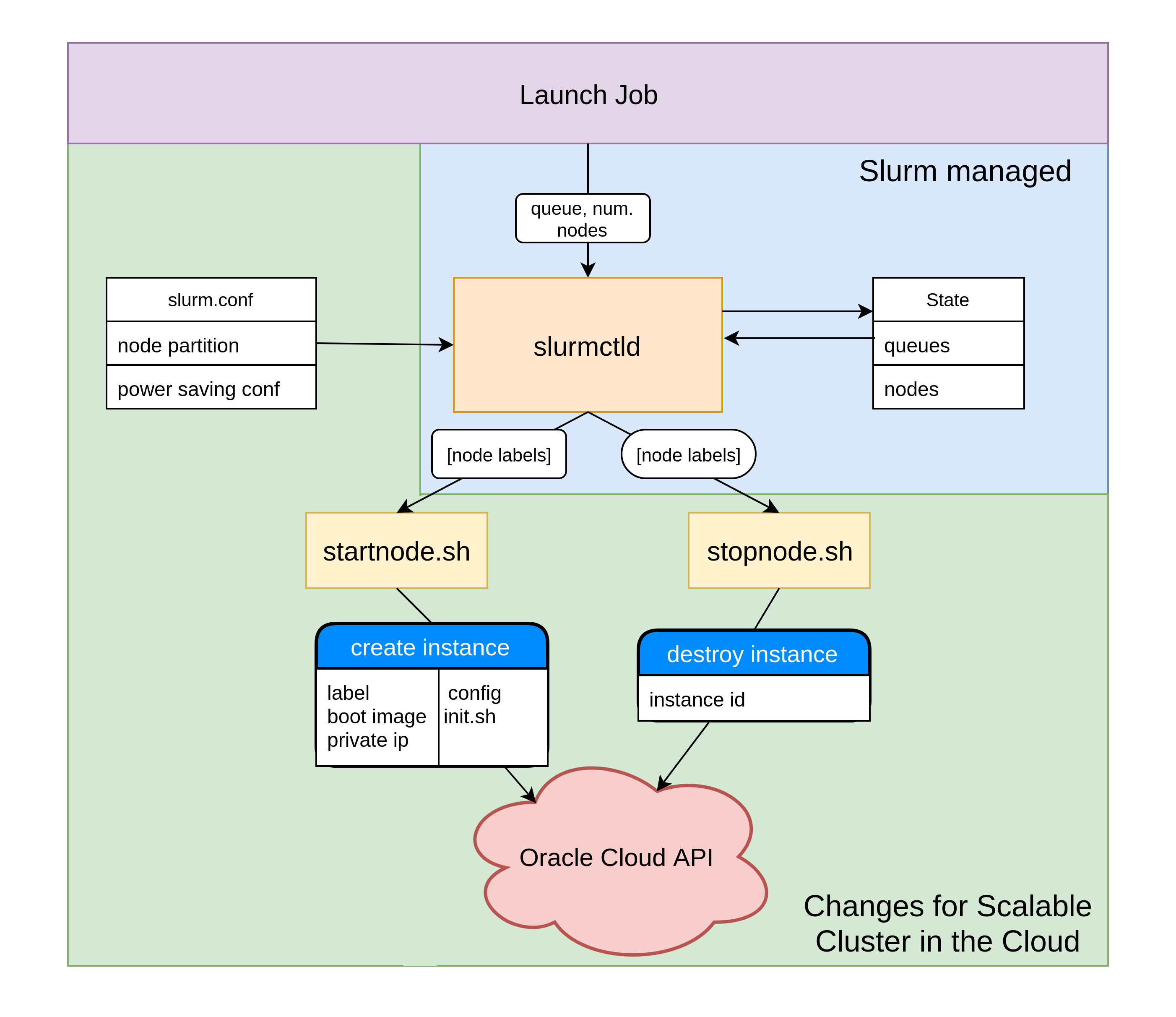
The figure bellow shows the major components that have been changed in this project in order to create a scalable heterogeneous cluster in the cloud. slurm.conf was changed to present to slurmctld different types of queues with very large number of nodes
The system interacts with Slurm power saving mechanism to achieve the automatic growing and shrinking behaviour for the cluster. This was acheived my modifying the startnode.sh and stopnode.sh nodes.
Finally, /etc/hosts was modified to trick Slurm the nodes in slurm.conf are connected to the network.
slurm.conf
The slurm.conf file is used for cluster resource management configuration and defines the grouping of nodes into partitions. This file sits on the shared file system, being read by all nodes in the cluster. It is this file that can be configured to present to Slurm, and in turn to the user, a multitude of queues with practically infinite amounts of available nodes
Extract from slurm.conf (found in /mnt/shared/apps/slurm/slurm.conf):
...

# ELASTIC
ResumeProgram=/usr/local/bin/startnode
SuspendProgram=/usr/local/bin/stopnode
SuspendTime=60
ResumeTimeout=600
SuspendTimeout=60

...

# COMPUTE NODES
NodeName=compute001 State=IDLE SocketsPerBoard=1 \
CoresPerSocket=1 ThreadsPerCore=2 RealMemory=6700

NodeName=compute002 State=IDLE SocketsPerBoard=1 \
CoresPerSocket=1 ThreadsPerCore=2 RealMemory=6700

NodeName=compute003 State=IDLE SocketsPerBoard=1 \
CoresPerSocket=1 ThreadsPerCore=2 RealMemory=6700

...

NodeName=compute100 State=IDLE SocketsPerBoard=1 CoresPerSocket=1
ThreadsPerCore=2 RealMemory=6700

# PARTITIONS
PartitionName=compute Nodes=compute[001-100] MaxTime=INFINITE \
State=UP Default=True OverSubscribe=NO

...
stopnode.sh
Slurm places nodes in a power-saving mode after they have been idle for a configured amount of time. This is achieved by the slurmctld deamon calling a script(stopnode.sh) to power down the nodes. This file was been modified to destroys nodes and their associated boot volumes if they have been idle for the configured amount of time. To showcase this behaviour, this was set to 2 minutes. Such measure prevents being charged for un-utilized resources.
Simplified extract from stopnode.sh:
#get the list of nodes
hosts=$(scontrol show hostnames $1)

#destroy instances
for host in ${hosts}
do
  id = get_instance_id(host)
  oci compute instance terminate --force --instance-id="${id}"
fi
done
startnode.sh
When a user launches a new job, the slurmctld deamon check for available nodes. Nodes ready to run the job are selected. If there are not enough ready nodes, the slurmctld selects nodes in power-saving mode and calls a script(startnode.sh) to power them on.
In our case, nodes in power saving mode are non-existent, so startnode.sh was edited to creates new instances. Simplified extract from startnode.sh:
#get the list of nodes
hosts=$(scontrol show hostnames $1)

#create instances
for host in ${hosts}
do
  instance_id=`python /usr/local/bin/createCustomInstance.py ${host}`
  sleep 2
done

#wait for instances to be in ready state and configured

#mark nodes for Slurm as ready to begin the task
for host in ${hosts}
do
  scontrol update nodename=${host} nodehostname=${host} state=Resume
done
- Each instances is passed the following arguments:
- its associated label(e.g. compute005)
- a shape (e.g. VM.Standard1.1 for computer, VM.Standard2.1 for highmem)
- a private IP address
- an initialization script
The initialization script is passed for the software configuration of the newly created nodes. This includes: connecting to the shared file system, creating users, installing and configuring Slurm, starting required processes as well as opening up ports to allow the communication between the slurmd deamon on the compute node and the slurmctld deamon on the management node.
Extract from simplified initialization script:
#mount the file system
yum install -y nfs-utils
mkdir -p /mnt/shared
mount 10.1.0.56:/shared /mnt/shared

#create users
useradd slurm -u 1001 --home /home/slurm
useradd codrin -u 1002 --home /mnt/shared/home/codrin

#install Slurm and dependencies
cd /mnt/shared/
yum-config-manager --add-repo file:/mnt/shared/apps/slurm/RPMS/x86_64
yum install -y --nogpgcheck slurm-slurmd slurm-libpmi munge
mkdir /etc/slurm
mkdir /var/log/slurm/
mkdir /var/spool/slurmd
chown slurm:slurm /var/spool/slurmd

#configure slurm

#open up ports for Slurm
firewall-cmd --permanent --add-port=6817-6818/tcp
firewall-cmd --add-port=6817-6818/tcp

#start slurm and dependency
systemctl start munge
systemctl start slurmd
A custom boot image has been created from a configured node to speed up this process. The required time to create new nodes is 4 minutes without using a custom boot image and under 2 minutes for using the custom boot image.
/etc/hosts
/etc/hosts was modified to trick Slurm the nodes in slurm.conf are connected to the network. Without this change, Slurm would not have added the nodes from slurm.conf into the coresponding partitions, thinking they are faulty/non-existent.
Extract from /etc/hosts:
127.0.0.1   localhost localhost.localdomain localhost4 localhost4.localdomain4
::1         localhost localhost.localdomain localhost6 localhost6.localdomain6
10.1.0.201 compute001.subnetad3.clustervcn.oraclevcn.com compute001
10.1.0.202 compute002.subnetad3.clustervcn.oraclevcn.com compute002
10.1.0.203 compute003.subnetad3.clustervcn.oraclevcn.com compute003
10.1.0.204 compute004.subnetad3.clustervcn.oraclevcn.com compute004
...
10.1.0.220 compute004.subnetad3.clustervcn.oraclevcn.com compute020
10.1.0.80 mgmt.subnetad3.clustervcn.oraclevcn.com mgmt